
Brick Calculator: Your Ultimate Tool for Accurate Construction Planning
Your weekend project is coming to an end. All day you have been building a garden wall, mixing mortar, and carefully leveling each course. You take the next brick to complete the last row, but the pallet is empty. You are a dozen bricks short. The frustration is so intense that it feels as if work must stop, the timeline is shattered, and you are left with the inconvenience of an expensive second delivery for a few materials. On the other hand, leaving a pile of unused bricks after finishing the job is just as bad, as it symbolizes hundreds of dollars in wasted budget sitting idle in your driveway.
This hectic “guesstimation” game is precisely what Calculator. Gocalc was created to end. The platform, a digital construction and DIY planning hub, changes how builders and homeowners think about logistics. Rather than depending on rough calculations or standard estimates, use the Calculator. Gocalc provides a variety of professional tools that deliver accuracy comparable to that of professionals across every phase of a build, turning potential logistical nightmares into smooth workflows. View Brick Calculator – Gocalc for More Details
We will highlight one of the platform’s most essential services in this guide: the Brick Calculator. This is not merely a counting tool; it offers a critical planning advantage by including real-world parameters such as mortar joint thickness, bond types, and waste percentages. No matter if you are building a one-skin ornamental wall or a two-skin load-bearing wall, this calculator will make sure that you order neither more nor less than what is required.
Keep reading to find out how the Brick Calculator can be of help in protecting your budget, making your ordering process more efficient, and giving the next masonry project an air of professional assurance.
Why Accurate Brick Estimation Matters in Construction Projects
In the field of masonry, there is no such thing as being precise as a matter of course; it is the essence of profitability and project success. A precise brick count is the key line between a carefree build and a logistical nightmare. If calculations are based on rough estimates rather than accurate data, the consequences will affect the entire project timeline.
Underestimating quantities is probably the most significant risk. The shortage of bricks not only halts work but also forces contractors to rush to find new stock. This usually results in purchasing from different production batches, where color variations may be subtle but can still ruin the look of a facade. On the other hand, overestimating creates its own set of problems. The purchase of surplus material not only locks up working capital but also increases waste that must be disposed of, leading to additional labor and disposal costs.
Apart from the financial impact, precision is critical for environmental sustainability. Reducing material waste is the most crucial aspect of responsible construction. Using accurate estimates ensures resources are allocated as effectively as possible, preventing raw materials from being sent to landfills. By specifying precise requirements at the outset, builders can exercise strict control over their budgets and environmental impact.
Getting Started: How to Access and Navigate the Brick Calculator
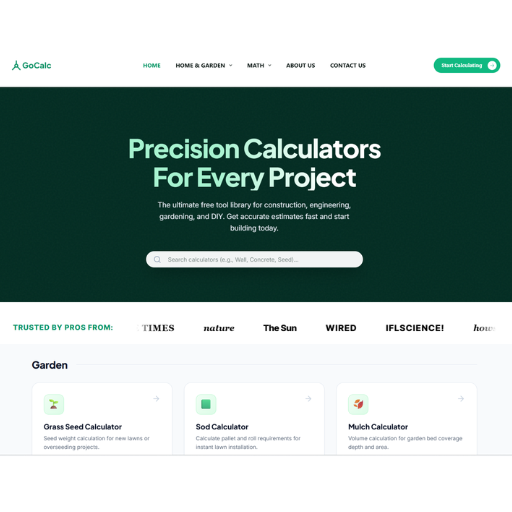
The platform of the Calculator. Gocalc’s major strength is its clean, intuitive design, which makes it easy to use while remaining powerful. You would not find yourself in a labyrinth of confusing menus or annoying ads. On the contrary, finding the Brick Calculator is quick and easy, allowing you to move from planning to calculation in seconds.
First, take this quick route:
- Homepage Navigation: Launch your web browser and type calculator.goldsupplier.com. You will very soon see the neat, customer-oriented design.
- Major Category Selection: Find and hit the “HOME & GARDEN” category. This part contains all the tools for planning and executing indoor/outdoor projects.
- Hardscape Section Discovery: In the Home & Garden menu, you will spot “Hardscape,” which is a sub-category. Here, among other things, you will find the calculators for pavers, gravel, and, of course, brick materials.
- Start the Tool: Hit “Brick Calculator” to launch the application.
This unambiguous navigation ensures that even first-time visitors can quickly locate exactly what they need. The platform is action-oriented; it lets you avoid complexity and get straight to your project’s challenges.
Step-by-Step Guide: Using the Brick Calculator for Precise Estimates
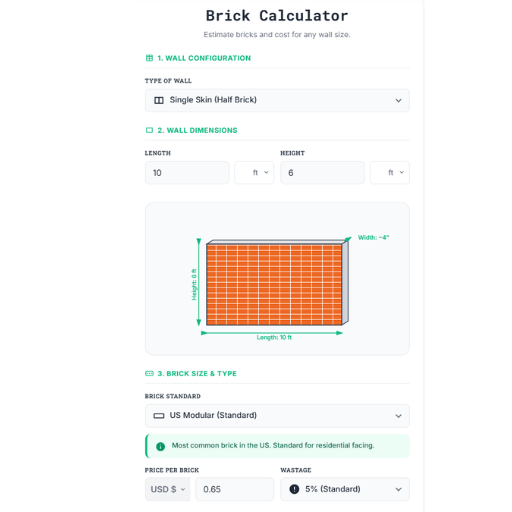
Managing construction logistics is like walking a tightrope: on one side are budget constraints, on the other, material requirements. However, thanks to the Brick Calculator on Calculator. Gocalc has eliminated this ambiguity by offering a straightforward, data-informed method of estimation. This tool, which simplifies the complex parameters of masonry into a straightforward three-step process, ensures your project planning is as strong as the wall you plan to build.
1. Configure Your Wall Structure
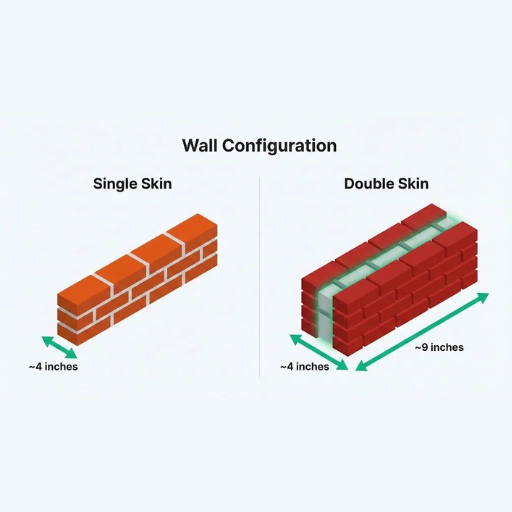
The first step is Wall Configuration, where you define the wall’s basic structure. You make this first decision by choosing which Type of Wall from among several options. For example, selecting “Single Skin (Half Brick)” indicates you are building either a garden wall or a standard partition wall. The importance of this step cannot be overstated; a structural double-skin wall consumes two times the material of a decorative single-skin facade. The system immediately adjusts its secret formulas based on this choice.
2. Input Precise Dimensions
Afterwards, the Wall Dimensions section is where you provide the actual length and height of your wall in feet. While entering—for example, 10 ft by 6 ft—the application simultaneously draws a diagram to verify your input. This drawing is done in real-time and has a lot of valuable features, such as wall thickness (for instance, ~4″), to make sure you are not taking the physical space of the wall incorrectly. This visualization eliminates data-entry errors before they become costly in material ordering.
3. Customize Brick Details and Costs
The last step is Brick Size & Type, where you can be very precise. You pick your Brick Standard—for instance, “US Modular”—and the standard measurements (usually 7 5/8″ x 2 1/4″ x 3 5/8”) get automatically applied to your selection. Moreover, a small info box confirms that this is the standard for the residential-facing side, which adds a bit more confidence to your decision. Most importantly, this section handles your budget. Entering the price per brick (e.g., $0.65) and selecting a wastage rate (typically set at 5%) are among the steps the calculator performs. The calculator doesn’t just count bricks; it estimates your financial outlay based on unavoidable on-site breakage.
By sticking to these precise steps, you turn a rough idea into a working blueprint. This process allows all factors—such as mortar joint thickness and broken bricks—to be accounted for, preventing both shortages and budget overruns.
Avoiding Common Pitfalls: How the Brick Calculator Saves Time and Money
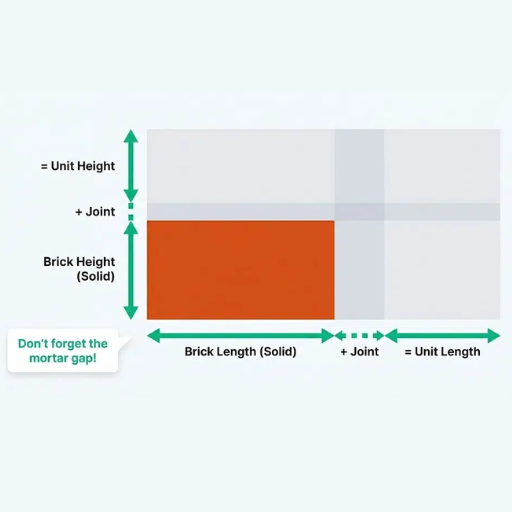
It is well known that manual brick estimation can lead to costly errors that may ultimately result in a project’s collapse. One common mistake is miscalculating the total area, which results in a material shortage, halting work, and incurring costly rush-order costs. Another recurring mistake is failing to account for mortar joints, which can significantly affect the total brick count on large surfaces. The last situation, where budgeting for wastage—the broken or cut bricks that are inevitable—being overlooked often leaves you short just before the job is completed.
The Brick Calculator is a tool designed to help you address these red spots. It needs walls with specific dimensions, which means no educated guesses, and confirms that your area calculation is right from the beginning. The internal algorithm calculates the space for standard mortar joints depending on the brick type you select, and this happens automatically, which is a complicated but easy-to-miss calculation.
The most powerful attribute for protecting your budget is the Wastage setting, which is adjustable. By allowing you to put a buffer (like 5% or 10%), the instrument makes sure that you will have ordered enough material to cover accidental breakage, and at the same time, you won’t spend more than you want. Thanks to this insight, the last-minute panic over running out of supplies is eliminated and you also save the cost of purchasing extra bricks that have to be disposed of since they are no longer wanted for the project. The tool transforms these costly mistakes into calculated inputs, thereby saving you time, preventing waste, and keeping your project squarely on budget.
Beyond Bricks: Why Calculator.Gocalc is Your Go-To Planning Partner
In this guide, we have discussed how the Brick Calculator has evolved from a guessing game to an exact science. The calculator provides detailed control over variables such as wall configuration, exact measurements, and waste percentages, so users can avoid running out of materials or being left with costly waste. It provides a solution to the challenges construction already faces—unexpected cost overruns, delays, and logistical issues—by presenting a clear, data-driven path ahead.
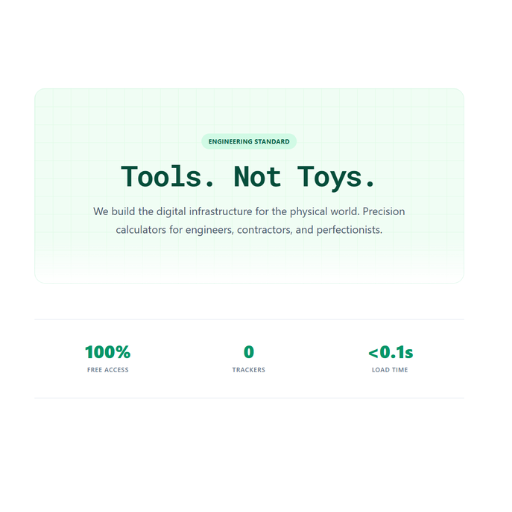
But, the worth of Calculator. Gocalc goes well beyond a single instrument. Just as a construction project is not just about bricks, our platform provides a full range of tools to support your planning. For instance, if you need to calculate gravel for a driveway, estimate sod for a lawn or figure out asphalt needs for a commercial lot, the same precision and “Privacy by Design” will prevail. We eliminate the messy, promoted interfaces and replace them with good, fast, and local processing tools that value your time and data.
Eventually, successful construction planning boils down to confidence. When you opt for the Brick Calculator: Your Ultimate Tool for Accurate Construction Planning, you are not merely performing calculations; instead, you are creating a trustworthy roadmap to success. You receive the confidence that your budget is precise, your order is correct, and your project is set up for easy execution.
We encourage you to make precision the standard in your workflow. Do not let estimation errors ruin your effort. Check out the complete collection of calculators on Calculator. Gocalc today, and see how the ideal planning partner may convert your next complicated project into your most trouble-free achievement so far. No more guessing, only calculating, and building with assurance.
Information contained on this page is provided by an independent third-party content provider. XPRMedia and this Site make no warranties or representations in connection therewith. If you are affiliated with this page and would like it removed please contact [email protected]
